What you need
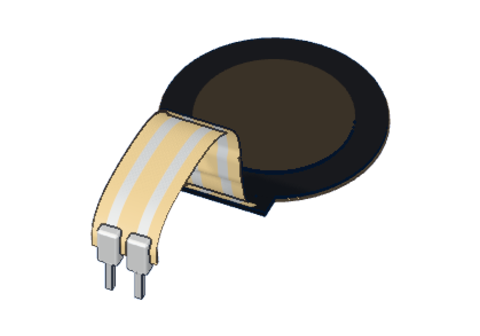 Force-sensing resistor (FSR)
 10 kΩ resistor
 Arduino UNO R3 (or a compatible board)
 Half-size breadboard
- Jumper wires (male–male)
Don't have the parts? Build it in 3D first.
What it is
A force-sensing resistor (FSR) is a thin round pad, 18 mm across, on a flat strip with two legs. Its resistance falls as you press harder: from millions of ohms when nobody touches it to a few hundred ohms under a hard push. Like any resistor it has no + or −, so it works either way round. See it in 3D.
How it works inside
The pad is a sandwich of two thin plastic layers:
- one layer is printed with two sets of interleaved metal "fingers" — the two legs;
- the other is coated with a conductive ink full of tiny particles;
- a thin spacer keeps them apart.
When nothing presses, the ink does not touch the fingers, and almost no current can pass. Press, and the ink touches the fingers in more and more places — the harder you press, the more paths, the lower the resistance.
These are the values the 3D lab uses (a typical FSR 402-type pad):
| Weight on the pad | FSR resistance |
|---|---|
| Nothing | 10 MΩ (open) |
| 100 g (a light touch) | 10 kΩ |
| 1 kg (a firm press) | 1 kΩ |
| 5 kg (a hard push) | 200 Ω |
Ten times the force gives about ten times less resistance. It is great for "how hard", but it is not a precise scale: two pads, or the same pad pressed with a fingertip or a thumb, give different numbers.
Why it needs a 10 kΩ resistor
The Arduino measures voltage, not resistance. So the FSR goes into a voltage divider with a fixed 10 kΩ resistor: FSR from 5V to A0, 10 kΩ from A0 to GND. As the FSR's resistance falls, more of the 5 V appears across the 10 kΩ resistor — and A0 rises.
| Press | FSR | analogRead(A0) |
|---|---|---|
| Nothing | 10 MΩ | about 1 |
| 100 g | 10 kΩ | about 511 |
| 500 g | 2 kΩ | about 852 |
| 1 kg | 1 kΩ | about 930 |
| 5 kg | 200 Ω | about 1003 |
Harder = higher reading. Without the 10 kΩ resistor, A0 has nothing pulling it down and floats when the pad is not pressed. The same trick reads light in the LDR guide.
The pins
| Pin | What it does |
|---|---|
| Leg 1, leg 2 | Either way round |
| Spec | Value |
|---|---|
| Pad | 18 mm round |
| Resistance | ≈ 10 kΩ at 100 g, 1 kΩ at 1 kg |
How to wire it to an Arduino
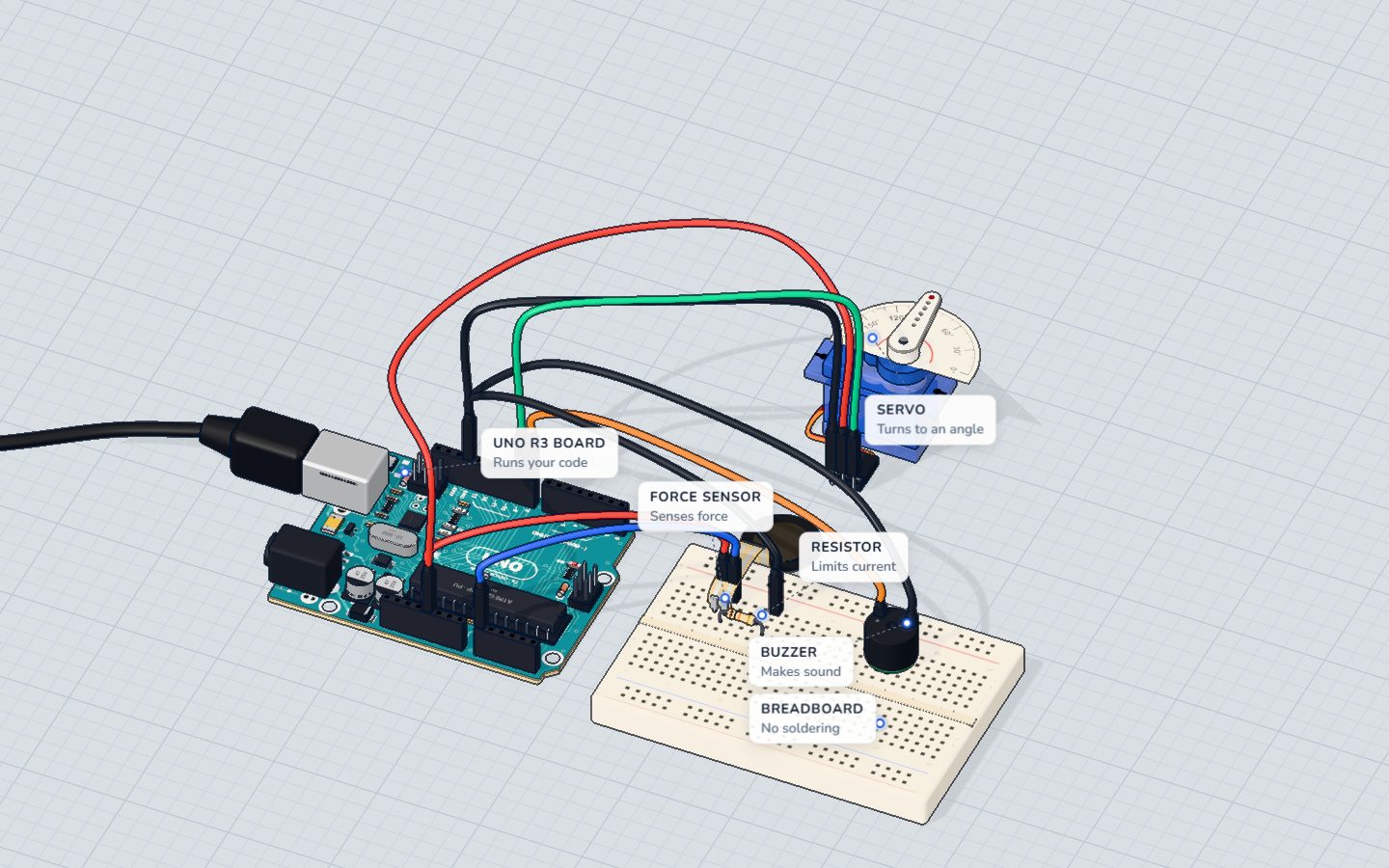
This is the sensor's side of the strength tester project:
- Push the FSR's two legs into the breadboard, each in its own row.
- 5V → one leg.
- The other leg → A0, and in the same row one leg of a 10 kΩ resistor.
- The resistor's other leg → GND.
| Part pin | Goes to | What it does |
|---|---|---|
| FSR leg 1 | 5V | Top of the divider |
| FSR leg 2 + 10 kΩ | A0 | The voltage we read |
| 10 kΩ other leg | GND | Pulls A0 down when nothing presses |
Example code
To just see the numbers, this sketch from the component library is all you need:
void setup() {
  Serial.begin(9600);
}

void loop() {
  Serial.println(analogRead(A0)); // harder = higher
  delay(100);
}
The strength tester goes further: a servo on pin 9 swings a needle, and a buzzer on pin 8 rings a bell. This is its exact code:
#include <Servo.h>
Servo needle;
const int PAD = A0, BELL = 8;
const int RING_AT = 880;
int best = 0;
unsigned long bestAt = 0;
bool rung = false;

void setup() {
  needle.attach(9);
  Serial.begin(9600);
}

void loop() {
  int force = analogRead(PAD);
  if (force >= best || millis() - bestAt > 1500) { best = force; bestAt = millis(); } // hold the best for 1.5 s
  needle.write(map(best, 0, 1023, 0, 180));
  if (best >= RING_AT && !rung) { tone(BELL, 1568, 400); rung = true; Serial.println("DING!"); }
  if (best < RING_AT - 100) rung = false;
  Serial.println(force);
  delay(40);
}
map(best, 0, 1023, 0, 180)turns the force into a needle angle.millis()counts milliseconds since the start, so the needle can hold your best for 1.5 s withoutdelay()stopping everything.RING_AT = 880means the FSR is down to about 1.6 kΩ — roughly a 600 g press rings the bell.
Common mistakes
- No 10 kΩ resistor. The reading floats or sits near 1023. The divider needs both parts.
- Bending the strip near the legs. The thin tail cracks easily. Tape the pad down and let the strip lie flat.
- Expecting grams. An FSR shows "harder or softer", not exact weight. Use a load cell for a kitchen scale.
- Soldering the legs. Real FSR tails melt. Use a breadboard or crimp connectors.
Check yourself
What happens to an FSR's resistance as you press harder?
More pressure makes more contact inside, so it conducts better.
With the FSR on the 5V side and 10 kΩ to GND, about what does a 100 g press read?
At 100 g the FSR is about 10 kΩ, equal to the fixed resistor, so A0 gets half of 5 V.
Is an FSR a good choice for a precise kitchen scale?
Readings vary between pads and with how you press. A load cell is the part for weighing.
Questions people ask
What is a force-sensing resistor used for?
For sensing a press or a squeeze: drum pads, game controllers, robot grippers, seat or bed sensors, and "is something standing here?" mats.
How do I connect an FSR to Arduino?
One leg to 5V, the other to A0, and a 10 kΩ resistor from A0 to GND. Then analogRead(A0) goes up the harder you press.
Can an FSR measure weight in kilograms?
Only roughly. Readings change between pads and with where and how you press. For real weighing, use a load cell with an HX711 amplifier.
Does an FSR have a positive and negative side?
No. It is a resistor, so either leg can go to 5V.
Where it is used
Build the strength tester: an FSR, a servo needle and a buzzer bell.
Build it yourself in 3DFree, in your browser — no board, no wires, nothing to buy.Open the 3D lab →Your progress stays on this device — no account, nothing sent anywhere.
Last updated 2026-10-29