What you need
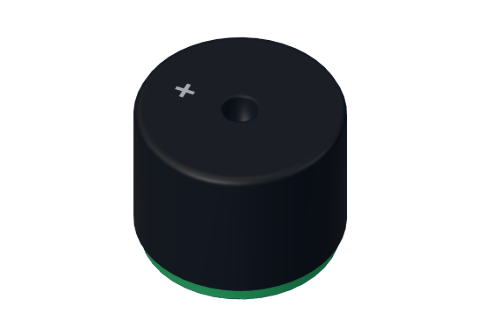 Passive piezo buzzer
 Arduino UNO R3 (or a compatible board)
 Half-size breadboard
- Jumper wires (male–male)
Don't have the parts? Build it in 3D first.
What it is
A passive piezo buzzer is a small round speaker, 12 mm across, with two legs. It has no sound of its own: it clicks each time its pin changes between HIGH and LOW. Make the pin change fast and regularly, and the clicks join into a note. Arduino's tone() function does exactly that, at any frequency you ask for. See it in 3D.
How it works inside
Inside the black case is a thin metal disc with a layer of piezo crystal on it — a material that bends a tiny bit when a voltage is put across it. Every time the pin goes HIGH the disc bends one way; every time it goes LOW it springs back. Each bend pushes the air, and pushes in the air are sound.
The frequency — how many times per second the pin flips — is the note you hear. More flips per second, higher note:
| Note | Frequency |
|---|---|
| C (Do) | 262 Hz |
| D (Re) | 294 Hz |
| E (Mi) | 330 Hz |
| F (Fa) | 349 Hz |
| G (Sol) | 392 Hz |
| A (La) | 440 Hz |
| B (Ti) | 494 Hz |
| C (high Do) | 523 Hz |
At 440 Hz one full HIGH-then-LOW wave takes 1 ÷ 440 ≈ 2.3 ms. Double a frequency and you get the same note one octave higher: 440 Hz → 880 Hz.
Passive or active?
| Passive (this one) | Active | |
|---|---|---|
| Inside | Just the piezo disc | Disc plus its own oscillator |
| With a steady HIGH | Silent (one click) | Beeps at its one fixed pitch |
| Can play tunes | Yes, any frequency with tone() | No, only on/off |
If your buzzer beeps when you simply put 5 V on it, it is an active one.
The pins
| Pin | What it does |
|---|---|
| + | To a digital pin (marked + on top) |
| − | To GND |
| Spec | Value |
|---|---|
| Type | 12 mm passive piezo |
| Range | about 100 Hz – 10 kHz |
How to wire it to an Arduino
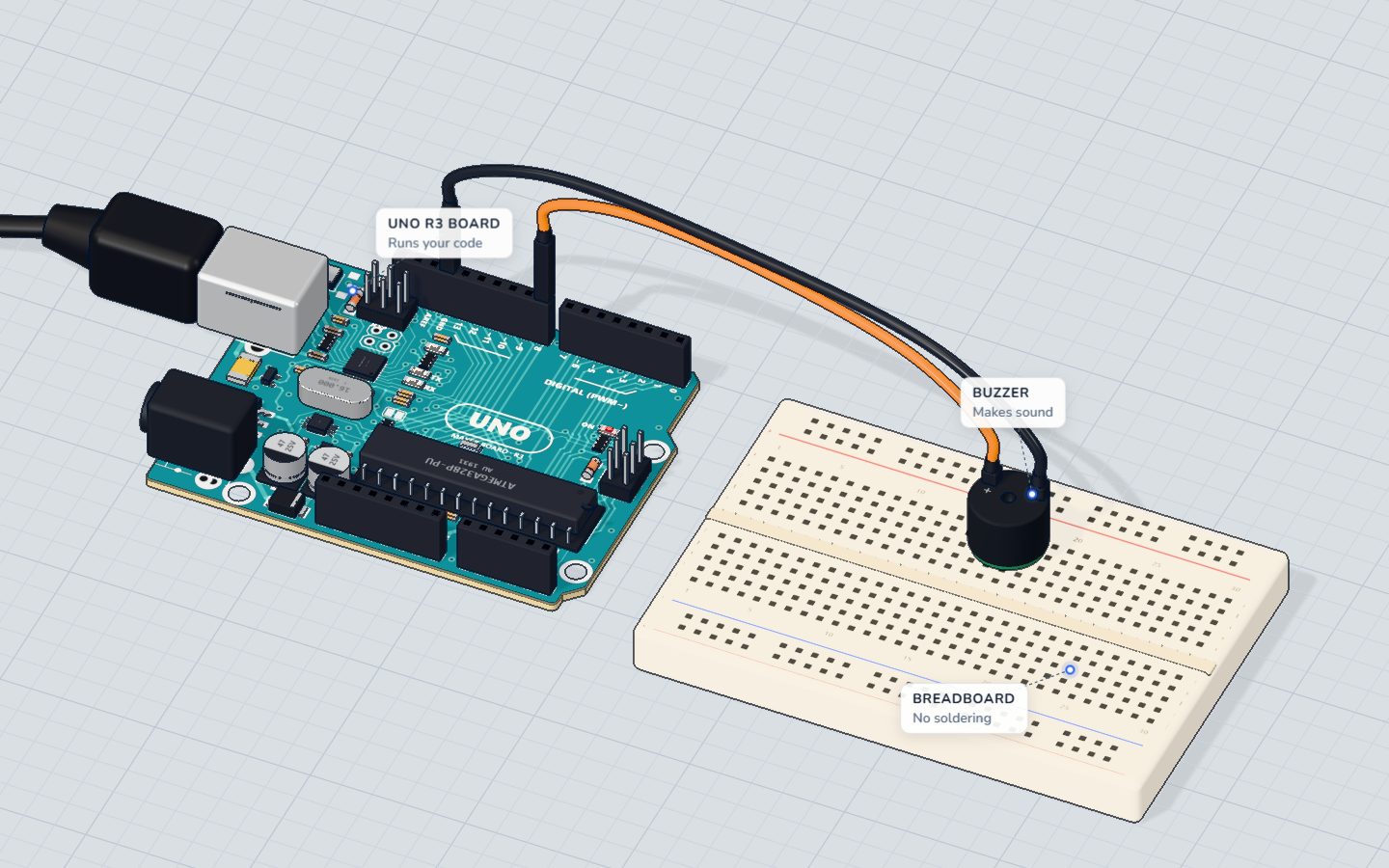
This is the wiring of the play a tune project:
- Push the buzzer into the breadboard. Its legs are about 7.6 mm apart, so they land three columns apart.
- Pin 8 → the + leg.
- The − leg → GND.
Any digital pin works, not only the ~ pins — tone() makes its own fast signal.
Example code
The exact code of the tune project — it plays "Ode to Joy" from two arrays:
const int BUZZER = 8;
// "Ode to Joy" (Beethoven): E E F G G F E D C C D E E D D
const int NOTES[] = { 330, 330, 349, 392, 392, 349, 330, 294, 262, 262, 294, 330, 330, 294, 294 };
const int BEATS[] = { 1, 1, 1, 1, 1, 1, 1, 1, 1, 1, 1, 1, 1, 1, 2 };
const int COUNT = 15;
const int BEAT = 300; // ms

void setup() {
  Serial.begin(9600);
}

void loop() {
  for (int i = 0; i < COUNT; i++) {
    int ms = BEATS[i] * BEAT;
    tone(BUZZER, NOTES[i], ms - 30);
    Serial.println(NOTES[i]);
    delay(ms);
  }
  delay(1500);
}NOTES[]holds each note's frequency in Hz;BEATS[]how many beats it lasts.tone(BUZZER, NOTES[i], ms - 30)plays the note for a little less than its beat — the 30 ms gap keeps two equal notes from blurring into one.delay(ms)waits for the beat;tone()itself does not wait.- To stop a note started without a duration, call
noTone(BUZZER).
Common mistakes
- Silence with
digitalWrite(8, HIGH). A passive buzzer needs a changing signal. Usetone(). - Notes run together. Without a gap, two equal notes sound like one long one. Play each slightly shorter than its beat.
- A very quiet buzzer. Very low notes (under about 100 Hz) are weak on a small piezo. Try 400–4000 Hz.
- Nothing in the 3D lab. Sound is off by default — switch it on in the toolbar.
Check yourself
What does tone(8, 440) do?
The frequency is how many times a second the pin goes HIGH and LOW again.
You double a note's frequency. What do you hear?
440 Hz is A; 880 Hz is the A one octave up.
Why does a passive buzzer stay silent with a steady HIGH?
Steady voltage bends the disc once and holds it there: one click, then silence.
Questions people ask
What is the difference between an active and a passive buzzer?
An active buzzer has its own oscillator and beeps at one pitch when you give it power. A passive buzzer needs a changing signal, like tone(), but can play any note.
Does a buzzer need a resistor on Arduino?
A small passive piezo buzzer passes almost no current, so it is usually wired straight to the pin and GND. A magnetic (coil) buzzer is different and needs a transistor.
How do I play two notes at once?
tone() can only play one note at a time on an UNO. Play them one after another quickly, or use two Arduinos.
How do I make the buzzer stop?
Give tone() a duration in milliseconds as the third number, or call noTone(pin).
Where it is used
Play music in the play a tune project. In the 3D lab the buzzer also becomes an eight-key mini piano, and rings the bell of the strength tester.
Build it yourself in 3DFree, in your browser — no board, no wires, nothing to buy.Open the 3D lab →Your progress stays on this device — no account, nothing sent anywhere.
Last updated 2026-10-29