What you need
 Arduino UNO R3 (or a compatible board)
- USB cable (A to B)
Don't have the parts? Build it in 3D first.
What it is
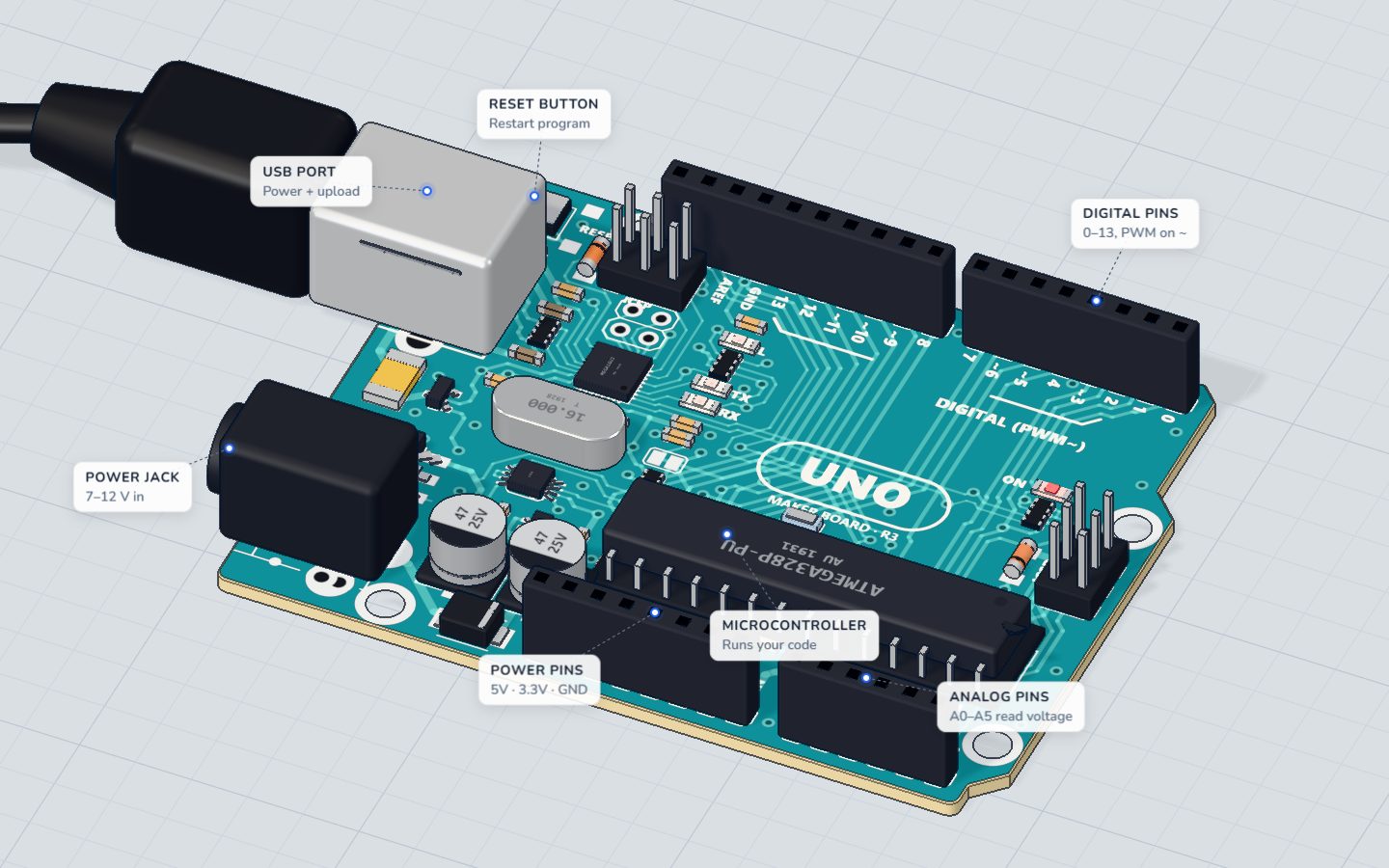
The Arduino UNO is a small board built around one chip, the ATmega328P microcontroller — a tiny computer that runs one program (a sketch) on its own. You write the sketch on your computer, upload it over USB, and the board runs it again and again for as long as it has power.
Everything the board does with the outside world goes through its pins: the black sockets (headers) along the two long edges. Wires plug straight into them. See it in 3D and turn it around while you read.
How it works inside
The chip runs at 16 MHz (16 million steps a second). It keeps your program in 32 KB of flash memory, which stays when the power is off, and its variables in 2 KB of RAM, which does not. The board itself works at 5 V.
Each pin is wired to the chip. The program decides, pin by pin, whether it is an output (the chip puts 5 V or 0 V on it) or an input (the chip only looks at the voltage that is there). That is all pinMode() does.
The pins
| Pins | What they do |
|---|---|
| D0–D13 | Digital inputs and outputs: HIGH (5 V) or LOW (0 V). D0 and D1 also carry the serial monitor |
| ~3 ~5 ~6 ~9 ~10 ~11 | PWM pins: analogWrite() 0–255 can dim an LED or set a motor's speed |
| A0–A5 | Analog inputs: analogRead() turns 0–5 V into a number 0–1023. A4 = SDA and A5 = SCL for I²C |
| 5V · 3.3V | Power for your parts |
| GND | Ground — every circuit returns here |
The little ~ printed next to a pin number means it can do PWM (pulse-width modulation: switching on and off very fast to fake a level in between). Read PWM explained for the full story, and digital vs analog for why A0–A5 give numbers while D2–D13 give only HIGH or LOW.
How much current a pin can give
This is the number that keeps your board alive:
| Current | |
|---|---|
| Safe for one pin | 20 mA |
| Absolute maximum for one pin | 40 mA |
| An LED with a 220 Ω resistor | about 14 mA ✔ |
| A small DC motor | about 500 mA ✘ — needs a transistor |
In our 3D lab a pin that has to give more than 40 mA is damaged and stops working, just like on a real board. And if 5V is wired straight to GND, the board is short-circuited: more than 1 A flows and the whole board is burnt. Read how not to burn your Arduino before you build anything with motors.
How to wire things to it
Every circuit is a loop: out of a pin (or 5V), through your parts, and back to GND. If a part does not work, the first question is always: is its minus side really connected to GND?
- An output (LED, buzzer): a digital pin → the part → GND.
- An input (button, knob, sensor): 5V and GND power it, and its signal goes to a pin — digital for on/off, A0–A5 for "how much".
- Power for the board: the USB cable gives 5 V. The round jack takes 7–12 V when you are away from a computer.
Example code
You can try the UNO with nothing plugged in: pin 13 is joined to a tiny LED marked L on the board. This is the sketch of our first project:
// The board's own LED (marked L) is on pin 13.
int blinks = 0;

void setup() {
  pinMode(LED_BUILTIN, OUTPUT);
  Serial.begin(9600);
  Serial.println("Hello from the UNO!");
}

void loop() {
  digitalWrite(LED_BUILTIN, HIGH);
  delay(500);
  digitalWrite(LED_BUILTIN, LOW);
  delay(500);
  blinks = blinks + 1;
  Serial.print("Blinks: ");
  Serial.println(blinks);
}LED_BUILTINis just another name for 13.Serial.begin(9600)opens the link to your computer over USB — through pins D0 and D1, which is why you should leave those two free.Serial.println()sends a line of text to the serial monitor.
Common mistakes
- Using D0 or D1 for a part. They share the USB serial line, so uploads and the serial monitor fail. Start at D2.
analogWrite()on a pin without ~. Pins like 7 or 13 can only be fully on or off. Use 3, 5, 6, 9, 10 or 11 to dim.- Forgetting GND. The part and the board must share ground, or no current can flow back.
- A motor straight on a pin. It wants far more than 40 mA. Use a transistor.
- 5V touching GND. A short circuit — the fastest way to kill a board.
Check yourself
Which of these pins can dim an LED with analogWrite()?
Only the pins marked ~ (3, 5, 6, 9, 10, 11) can do PWM.
What number does analogRead() give for 5 V on A0?
The analog pins turn 0–5 V into 0–1023.
What is the absolute most current one pin can give?
20 mA is comfortable; above 40 mA the pin is damaged.
Questions people ask
How many pins does the Arduino UNO have?
It has 14 digital pins (D0–D13), 6 of which can do PWM, and 6 analog inputs (A0–A5). On top of that come the power pins: 5V, 3.3V, VIN and several GND pins.
What is the difference between the 5V and 3.3V pins?
Both give power for your parts. Most beginner sensors and modules here use 5V; 3.3V is for parts that would be damaged by 5 V. Neither should ever be wired straight to GND.
Can I power the Arduino UNO without a computer?
Yes. Plug a 7–12 V adapter or battery pack into the round jack, or use a USB power bank. The sketch you uploaded last starts by itself.
Why are some pins marked with a ~ sign?
The ~ marks the six PWM pins. They can switch on and off hundreds of times a second, which lets analogWrite() set brightness or speed instead of only on and off.
Where it is used
In every project here — it is the brain. Start with meet the board, then plug in your first part in Blink an LED.
Build it yourself in 3DFree, in your browser — no board, no wires, nothing to buy.Open the 3D lab →Your progress stays on this device — no account, nothing sent anywhere.
Last updated 2026-10-29