
What you need
 5 mm LED
 220 Ω resistor
 Arduino UNO R3 (or a compatible board)
 Half-size breadboard
- Jumper wires (male–male)
Don't have the parts? Build it in 3D first.
What it is
An LED (light-emitting diode) is a tiny lamp that lights when current flows through it — but only in one direction. It has two legs:
- the anode (+), the long leg, where current goes in;
- the cathode (−), the short leg, next to the flat side of the plastic rim, where current comes out.
Put it in backwards and nothing happens: no light, no damage, no current. See it in 3D.
How it works inside
Inside the clear plastic is a very small piece of semiconductor (a crystal that conducts only under the right conditions). When current pushes through it from + to −, it gives off light. The material sets the colour — and also how much voltage the LED "uses up" before it starts to glow. That voltage is called the forward voltage.
These are the values our 3D lab uses for a 5 mm LED:
| Colour | Forward voltage |
|---|---|
| Red | 1.9 V |
| Yellow | 2.0 V |
| Green | 2.1 V |
| Blue | 3.0 V |
| White | 3.0 V |
Here is the catch: once the voltage is above that level, an LED has almost no resistance left. A little more voltage means a lot more current. Nothing inside the LED stops it — so something outside must.
Why it needs a resistor
The resistor sits in the same loop as the LED and limits the current. Work it out with Ohm's law (I = V ÷ R; read Ohm's law explained if that is new):
| Red LED | Blue LED | |
|---|---|---|
| Pin voltage | 5 V | 5 V |
| LED takes | 1.9 V | 3.0 V |
| Left for a 220 Ω resistor | 3.1 V | 2.0 V |
| Current = V ÷ 220 Ω | ≈ 14 mA | ≈ 9 mA |
An LED is happy at about 10–20 mA. In our 3D lab, an LED that gets more than 50 mA burns out with a puff of smoke — and a pin that has to give more than 40 mA is damaged too. Wire a red LED straight from a pin to GND with no resistor and the current shoots far past both limits.
The pins
| Pin | What it does |
|---|---|
| Anode (+) | The long leg: current goes in here — toward the Arduino pin |
| Cathode (−) | The short leg, flat side: current comes out — toward GND |
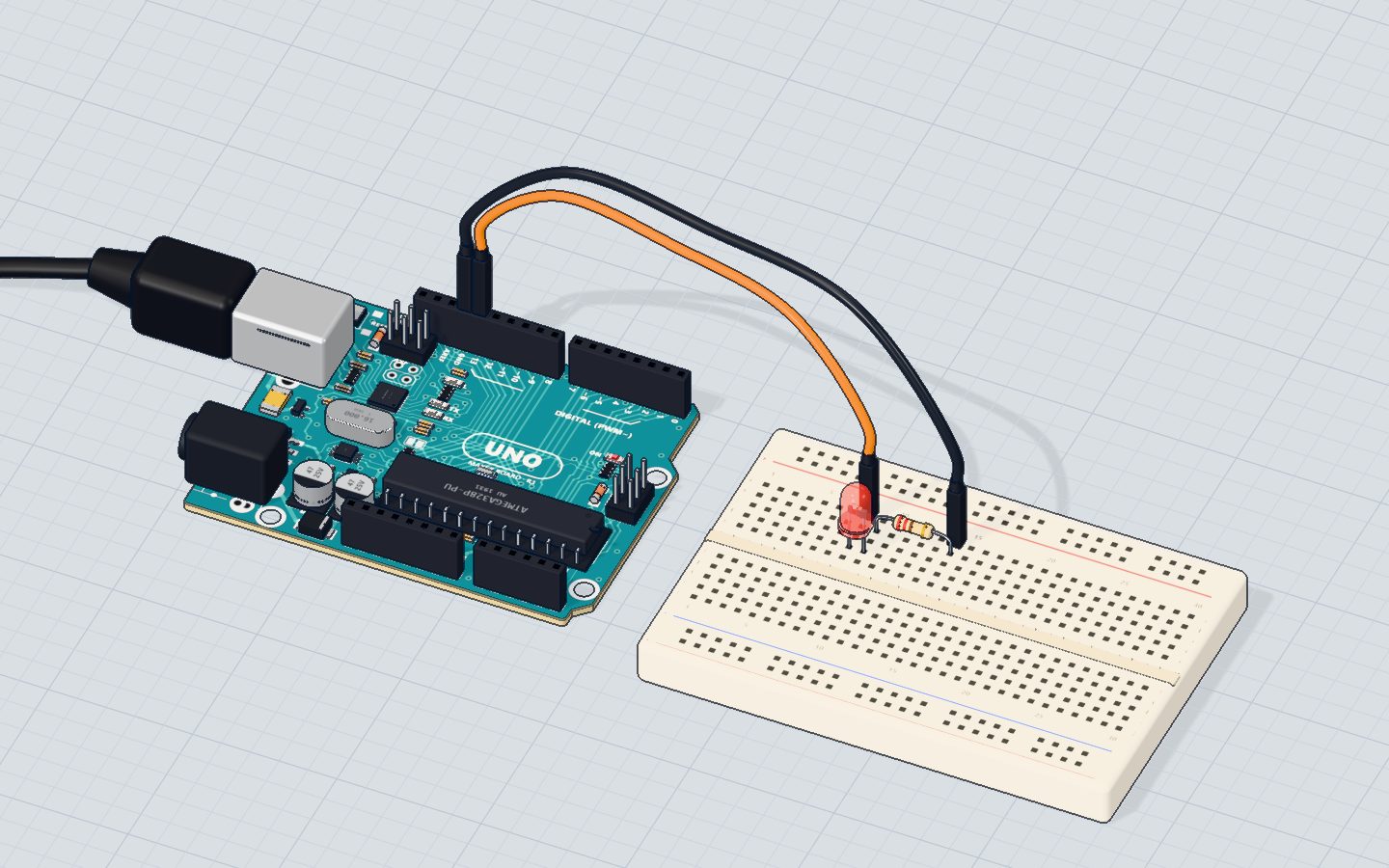
How to wire it to an Arduino
- Push the LED into the breadboard with its two legs in different rows.
- Put a 220 Ω resistor so one leg shares a row with the LED's short leg.
- A jumper from pin 13 to the LED's long leg.
- A jumper from the resistor's free leg to GND.
The resistor can go on either side of the LED — before or after — because the same current flows through the whole loop.
Example code
This is the code of the Blink project:
const int LED = 13;

void setup() {
  pinMode(LED, OUTPUT);
  Serial.begin(9600);
}

void loop() {
  digitalWrite(LED, HIGH);   // 5 V on the pin: current flows, the LED lights
  Serial.println("on");
  delay(1000);
  digitalWrite(LED, LOW);    // 0 V: no current, the LED goes dark
  Serial.println("off");
  delay(1000);
}
pinMode(LED, OUTPUT)lets the program drive the pin.digitalWrite(LED, HIGH)puts 5 V on the pin; current flows and the LED lights.digitalWrite(LED, LOW)puts 0 V on it; the LED goes dark.
To make an LED dim instead of just on and off, use analogWrite() on a ~ pin — see PWM explained.
Common mistakes
- The LED is in backwards. No light at all. Turn it round: long leg toward the pin.
- No resistor. Bright for a moment, then dead — and maybe a damaged pin. Always add one.
- Both legs in the same breadboard row. The row joins them, so no current goes through the LED. See how a breadboard works.
- A huge resistor. With 10 kΩ a red LED gets only 0.3 mA and looks off. Use 150 Ω to 1 kΩ.
Check yourself
Which leg of an LED goes toward the Arduino pin?
Current flows in at the anode, the long leg, and out at the cathode toward GND.
About how much current does a red LED get with a 220 Ω resistor on 5 V?
(5 V − 1.9 V) ÷ 220 Ω ≈ 0.014 A = 14 mA.
Why does a blue LED with the same resistor glow with less current than a red one?
A blue LED takes about 3.0 V, leaving 2.0 V for the resistor: 2.0 ÷ 220 ≈ 9 mA.
Questions people ask
How do I tell which leg of an LED is positive?
The long leg is positive (anode). If the legs have been cut, look at the rim of the plastic: the flat side marks the negative leg (cathode).
What happens if I connect an LED without a resistor?
Too much current flows. The LED flashes brightly and burns out, and the Arduino pin can be damaged too. In our 3D lab you can try it safely and watch it burn.
What resistor should I use for an LED with Arduino?
220 Ω or 330 Ω is the usual choice on 5 V. Anything from about 150 Ω to 1 kΩ works — bigger is dimmer.
Can an LED be connected backwards and still work?
No. It blocks current the wrong way, so it stays dark. A small LED is not damaged by being backwards on 5 V; just turn it round.
Where it is used
Start with Blink an LED, then dim one with a knob in the potentiometer project, or switch one on in the dark with the night light.
Build it yourself in 3DFree, in your browser — no board, no wires, nothing to buy.Open the 3D lab →Your progress stays on this device — no account, nothing sent anywhere.
Last updated 2026-10-29