
The short answer
A schematic (or circuit diagram) shows what is connected to what — not where the parts sit on the table. Each part is a small symbol, and lines are wires. Two rules cover most of it:
- Anything joined by a line is connected. Where lines cross with a dot, they are joined; where they cross with no dot, they are not.
- Points with the same label are connected, even with no line between them. Every GND symbol is the same ground; every 5V is the same supply.
The symbols you will meet
| Symbol | Part | What to look for |
|---|---|---|
| Zigzag (US) or a plain box (Europe) | Resistor | Its value is written next to it: 220, 10k, 1k |
| Triangle + bar + two arrows | LED | The triangle points the way current flows: from the anode (+, long leg) to the cathode (−, bar) |
| Triangle + bar | Diode | Same as an LED without the light. The bar end is the stripe on the real part |
| Two dots and a bridge | Push button / switch | Open until pressed |
| Resistor with an arrow pointing at it | Potentiometer | The arrow is the middle leg (the wiper) |
| Circle with three legs, an arrow on one | Transistor (NPN) | Base (B), collector (C), emitter (E, the leg with the arrow) |
| Three shrinking lines | GND | Ground, 0 V — where every current returns |
| A bar or an arrow pointing up | VCC / 5V | The positive supply |
Net labels: wires without lines
A net is a group of points that are all connected. On a big diagram, drawing every wire would be a mess, so engineers give a net a name instead: D13, A0, 5V, GND. Wherever you see the same name, imagine a wire between them.
This is exactly how our 3D lab draws your circuit. Open the Wiring tab on the Build page and choose Schematic: the lab draws the UNO's pins and every part you have placed, and pins with the same label are connected. You can even wire from there — pick one pin, then another.
Reading one, step by step
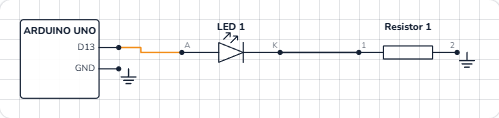
Take the Blink schematic above and follow the current like water:
- Find the supply. Here it is pin D13 — when the code sets it HIGH, it gives 5 V.
- Follow the line. D13 goes to the LED's anode (the flat side of the triangle).
- Through the part. The triangle points right, so current may flow that way. Out of the cathode (the bar)…
- …into the resistor, 220 Ω…
- …and back to GND. The loop is complete.
If you cannot trace a closed path from a supply back to GND, no current can flow — and that is often the bug.
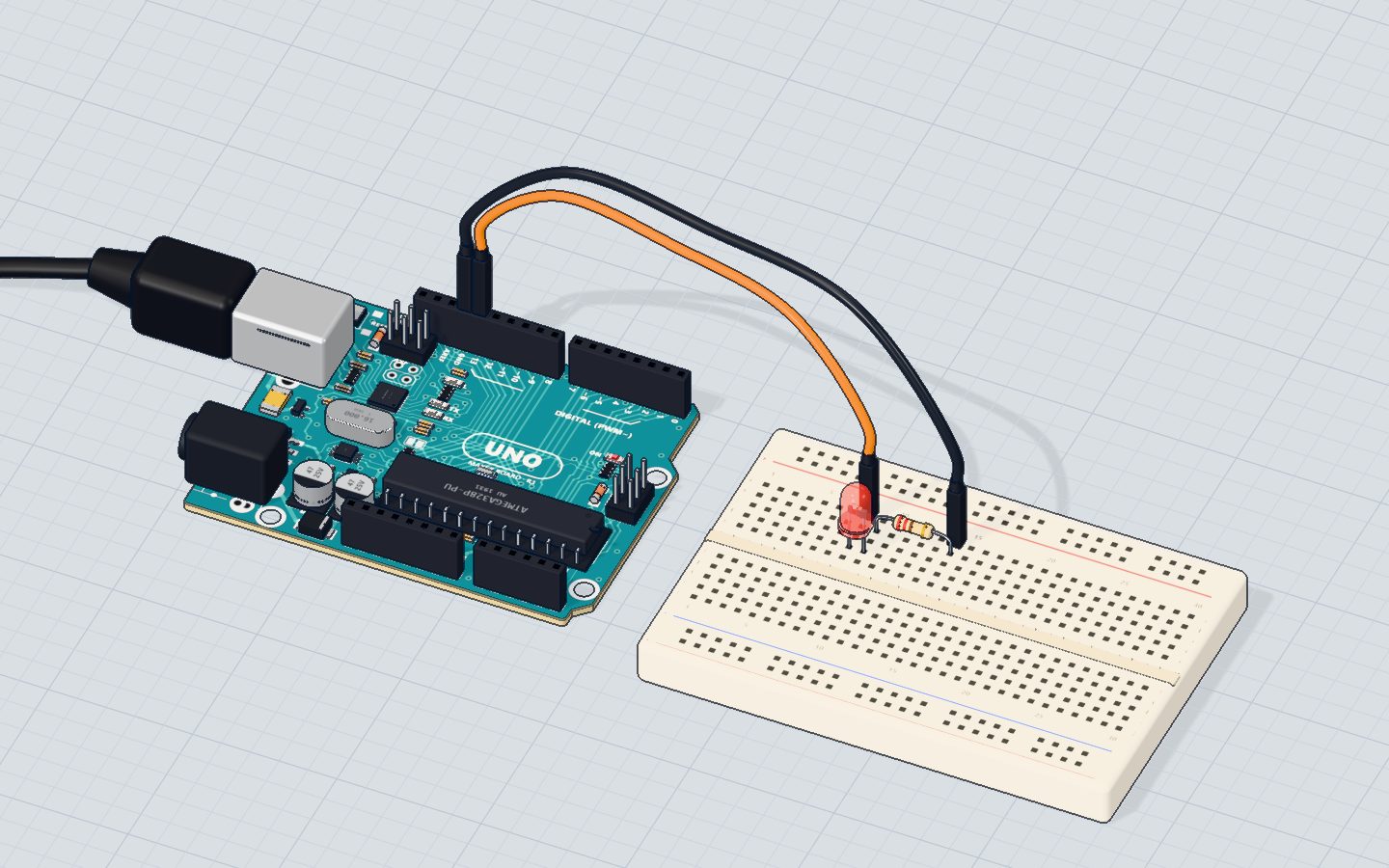
Schematic vs breadboard picture
| Schematic | Breadboard picture | |
|---|---|---|
| Shows | What connects to what | Where every leg and wire really goes |
| Good for | Understanding and checking a circuit | Copying a build hole by hole |
| Used by | Engineers, datasheets, PCB design | Beginner tutorials |
One schematic can be built many ways on a breadboard — the strips are just the lines of the schematic. See how a breadboard works.
Tips for your first diagrams
- Read left to right, top to bottom. Supplies are usually at the top, GND at the bottom, inputs on the left, outputs on the right.
- Look for the dot. A dot where lines meet means connected. No dot means they only cross.
- Check the values. "220" next to a resistor, "1N4001" next to a diode — they tell you exactly which part to buy.
- Match the pins. The UNO is drawn as a box with its pin names (D2, D13, A0, 5V, GND) — the pinout guide shows where each one is on the real board.
Check yourself
Two lines cross on a schematic with no dot. Are they connected?
A dot means joined; no dot means the wires just pass over each other.
Which way does current flow through an LED symbol?
Current flows from anode to cathode — the way the triangle points.
Two points on a diagram both say GND. What does that mean?
Points with the same net label are connected, even without a line.
Questions people ask
What is the difference between a schematic and a wiring diagram?
A schematic shows the electrical connections with standard symbols, not where the parts sit. A wiring (or breadboard) diagram is a picture of the real layout. Learn the schematic — it works for any layout.
What does VCC mean on a circuit diagram?
VCC is the positive supply voltage — on an Arduino UNO usually 5 V. You will also see VDD, V+ or simply 5V; they mean the same kind of thing.
How do I tell an LED from a diode on a schematic?
Both are a triangle with a bar. The LED has two small arrows pointing away from it — the light coming out.
Can I draw a schematic of my Arduino circuit automatically?
Yes. Build it in our free 3D lab and open the Wiring tab on the Build page: it draws the schematic of your circuit for you, with every pin labelled.
Build it yourself in 3DFree, in your browser — no board, no wires, nothing to buy.Open the 3D lab →Your progress stays on this device — no account, nothing sent anywhere.
Last updated 2026-10-29



