
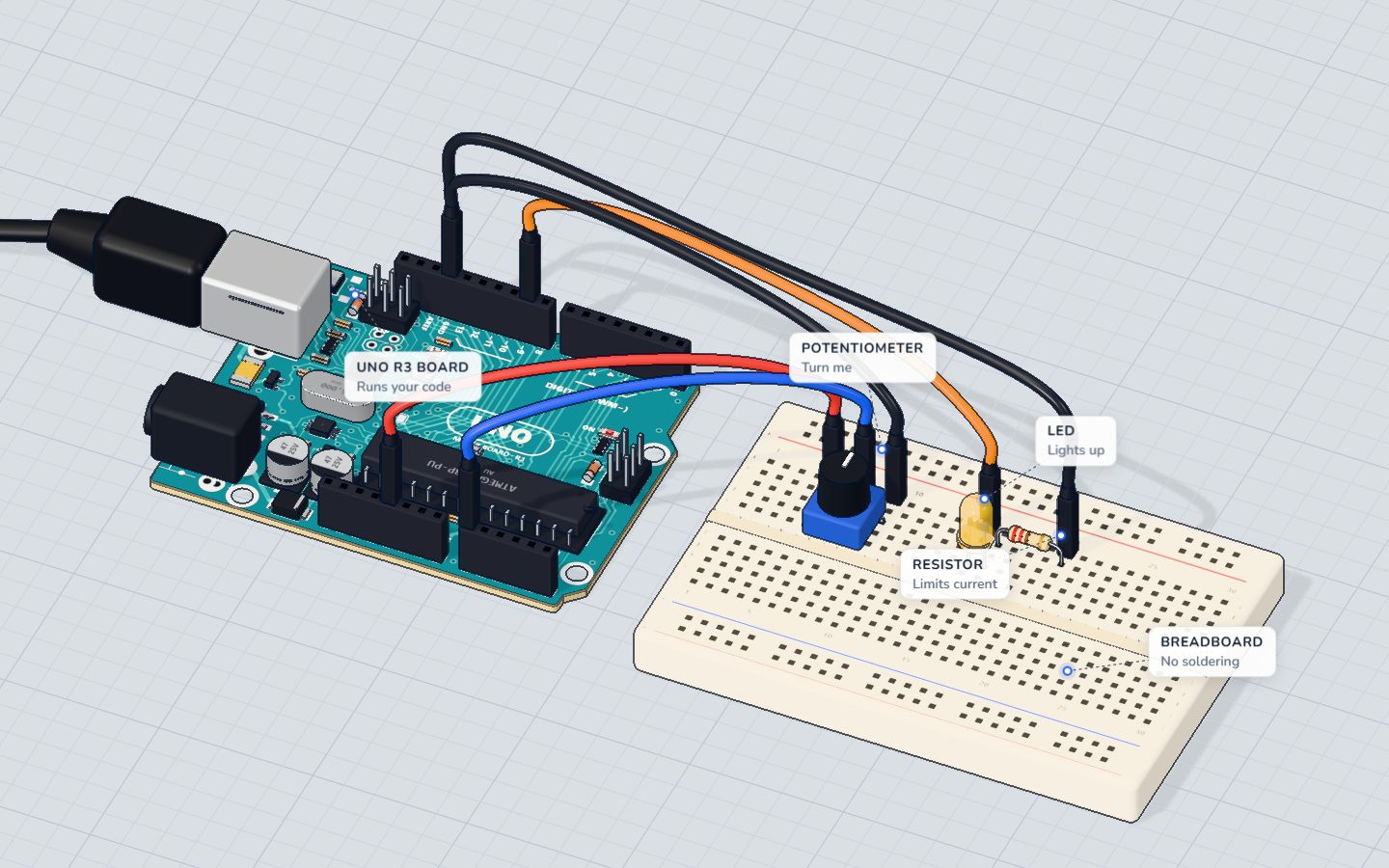
What you need
 Arduino UNO R3 (or a compatible board)
- USB cable (A to B)
 Half-size breadboard
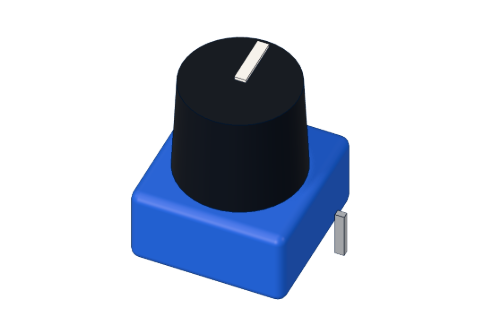 10 kΩ potentiometer
 5 mm LED
 220 Ω resistor
- Jumper wires (male–male)
Don't have the parts? Build it in 3D first.
What you will build
A knob (a potentiometer) and a yellow LED. Turn the knob one way and the LED glows brighter; turn it back and it fades out. The serial monitor shows both numbers live, like knob 512 -> LED 127.
Knobs like this are everywhere: volume controls, oven dials, joysticks (two knobs in one), and the speed control on a fan. Any time you want a person to choose how much, a potentiometer is the cheapest way.
How it works
A potentiometer is a 10 kΩ resistor with a sliding contact, called the wiper. The two outer legs go to 5 V and GND. As you turn the knob, the wiper slides along the resistor, and the middle leg gives any voltage between 0 and 5 V. This is a voltage divider. More in what is a potentiometer.
The UNO reads that voltage on A0 with analogRead(). Its converter splits 0–5 V into 1024 steps, so each step is about 4.9 mV:
| Knob position | Voltage on A0 | analogRead() | map() → LED |
|---|---|---|---|
| All the way to GND | 0 V | 0 | 0 (off) |
| A quarter | 1.25 V | ≈ 256 | ≈ 63 |
| Middle | 2.5 V | ≈ 512 | ≈ 127 |
| All the way to 5 V | 5 V | 1023 | 255 (full) |
To dim the LED, the program uses PWM (pulse-width modulation): pin 9 switches on and off hundreds of times a second. analogWrite(9, 127) keeps it on about half the time, so the LED looks half as bright. Only the pins marked ~ (3, 5, 6, 9, 10, 11) can do this. See PWM explained.
At full brightness the yellow LED (about 2.0 V) takes (5 − 2.0) V ÷ 220 Ω ≈ 14 mA — safe for the LED and the pin.
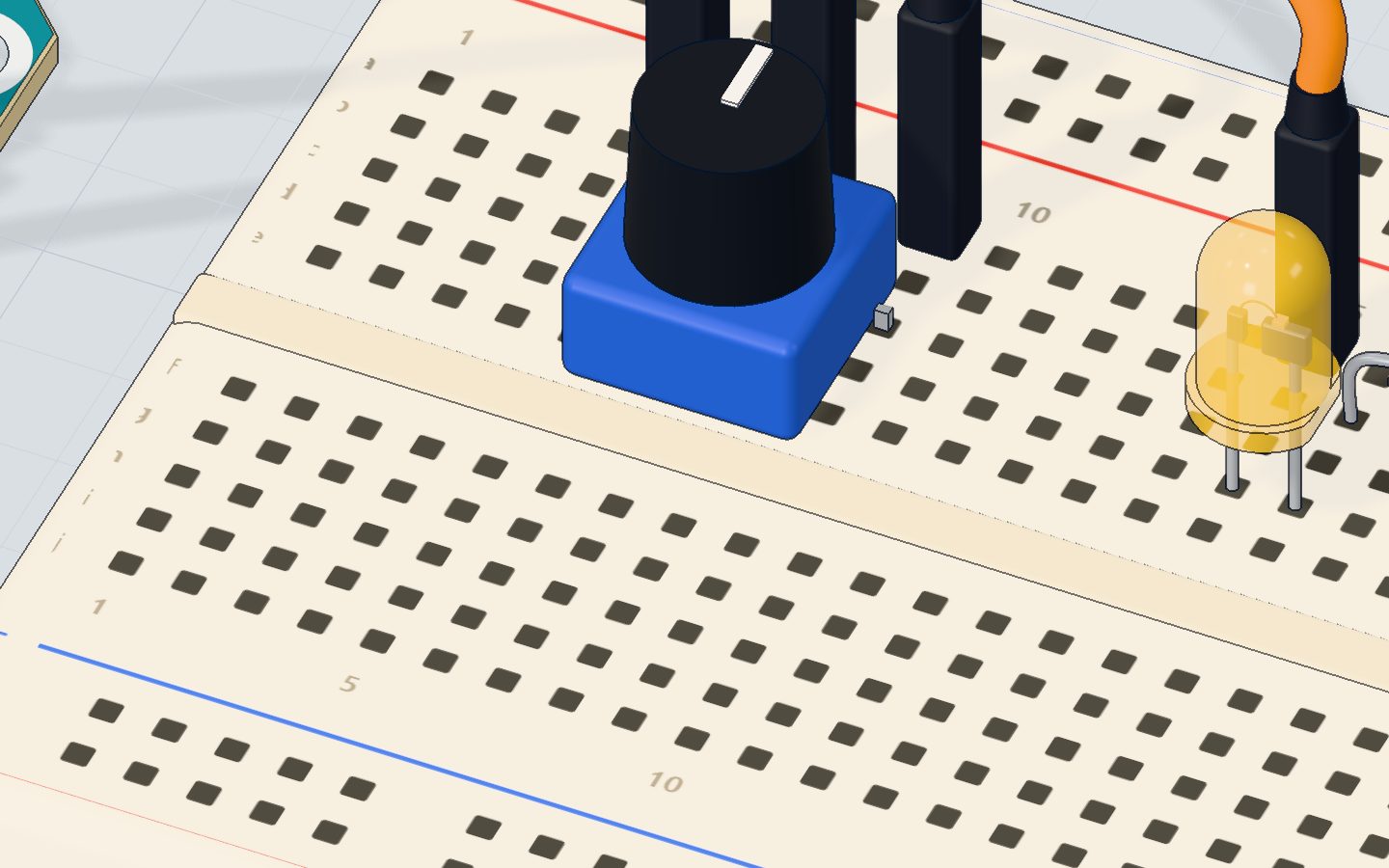
The wiring
- Push the potentiometer into the breadboard with its three legs in 5c, 7c and 9c.
- Jumper wires: 5V → 5a, 7a → A0 (the middle leg), 9a → GND.
- Push the yellow LED in with its long leg (+) in 15d and its short leg in 16d.
- Put the 220 Ω resistor from 16b to 20b.
- Jumper wires: pin 9 → 15a, 20a → GND.
| Part pin | Goes to | What it does |
|---|---|---|
| Potentiometer outer leg (5c) | 5V | The top of the divider |
| Potentiometer wiper (7c) | A0 | The voltage you set, read by the UNO |
| Potentiometer outer leg (9c) | GND | The bottom of the divider |
| LED long leg (+) | Pin 9 (~) | PWM dims the LED |
| LED short leg (−) | 220 Ω → GND | Limits the current |
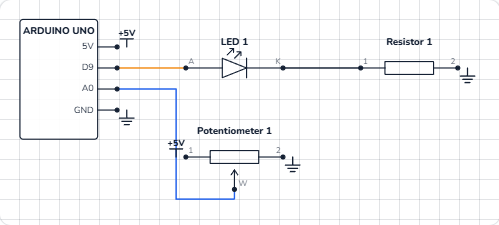
The code, line by line
const int KNOB = A0;
const int LED = 9;   // a ~ pin: it can dim

void setup() {
  pinMode(LED, OUTPUT);
  Serial.begin(9600);
}

void loop() {
  int reading = analogRead(KNOB);                // 0 … 1023
  int brightness = map(reading, 0, 1023, 0, 255); // 0 … 255
  analogWrite(LED, brightness);
  Serial.print("knob ");
  Serial.print(reading);
  Serial.print("  ->  LED ");
  Serial.println(brightness);
  delay(100);
}
const int KNOB = A0;names the analog pin.LED = 9— a ~ pin, so it can dim.analogRead(KNOB)measures the voltage on A0 and returns 0 to 1023.map(reading, 0, 1023, 0, 255)rescales one range to another: 0 stays 0, 1023 becomes 255, and everything in between moves in proportion. It uses whole numbers, so 512 becomes 127, not 127.6.analogWrite(LED, brightness)sets the PWM level, 0 (always off) to 255 (always on). You do not needanalogRead's 0–1023 here:analogWriteonly goes to 255.- The four
Serial.printlines build one line of text:knob 512 -> LED 127. Only the last one isprintln, which ends the line. delay(100)reads ten times a second — fast enough to feel instant, slow enough to read the monitor.
Common mistakes
- The LED is either fully on or fully off. It is on a pin without ~. Move it to pin 9 (or 3, 5, 6, 10, 11) — wire and code.
- The reading jumps around randomly. The wiper is not on A0, so the pin floats. Check that the middle leg goes to A0.
- The reading is stuck at 0 or 1023. One outer leg is missing its wire, or the middle leg is wired to 5V or GND by mistake.
analogWrite(LED, reading)without map(). Values above 255 wrap around, so the LED goes bright, dark, bright as you turn. Always scale withmap()(or divide by 4).
Try these challenges
- Flip the direction in code:
map(reading, 0, 1023, 255, 0). - Make the LED blink, with the knob setting the speed:
delay(reading);between on and off. - Light the LED only when the knob is past halfway (
if (reading > 512)). - In the 3D lab, drag around the knob, or type 512 in its number box, and compare the serial monitor with the table above.
Check yourself
What range of numbers does analogRead() return on the UNO?
The converter has 10 bits: 2¹⁰ = 1024 steps, numbered 0 to 1023.
Why is the LED on pin 9 and not on pin 8?
Only the ~ pins (3, 5, 6, 9, 10, 11) can dim with analogWrite().
What does map(1023, 0, 1023, 0, 255) give?
map() moves the value from the first range to the second: the top of one becomes the top of the other.
Questions people ask
How do I connect a potentiometer to an Arduino?
Outer legs to 5V and GND, the middle leg (the wiper) to an analog pin such as A0. Then analogRead(A0) gives 0–1023 as you turn the knob. It does not matter which outer leg gets 5V; swapping them only reverses the direction.
What value potentiometer should I use with Arduino?
10 kΩ is the usual choice and what this project uses. Anything from about 1 kΩ to 100 kΩ works; smaller values waste more current, much bigger ones give noisier readings.
Why use map() instead of dividing by 4?
For 0–1023 to 0–255, reading / 4 gives the same result. map() is clearer and works for any ranges — for example 0–1023 to a servo angle of 0–180.
Can analogWrite() output a real analog voltage?
No. On the UNO it makes PWM: fast on/off pulses at 5 V. An LED or motor averages them, so they behave as if the voltage were lower.
What's next
One LED, one brightness. Now control three at once and mix any colour you like: the RGB LED project.
Try this project in 3DRun the code, press the parts, break things safely — free, in your browser.Open in 3D →Your progress stays on this device — no account, nothing sent anywhere.
Last updated 2026-10-29