
What you need
 Arduino UNO R3 (or a compatible board)
- USB cable (A to B)
 Half-size breadboard
- Jumper wires (male–male)
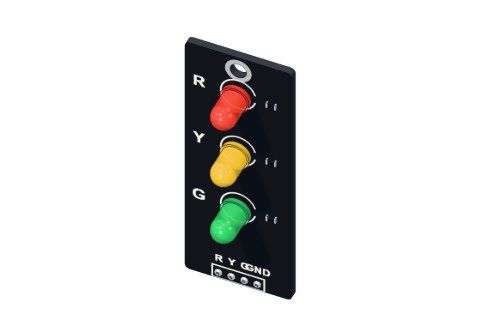 Traffic-light LED module
Don't have the parts? Build it in 3D first.
What it is
A traffic light module is a small board with a red, a yellow and a green LED, each with its own 220 Ω resistor already soldered on. It has four pins: R, Y, G and GND. Wire each colour to an Arduino pin, GND to GND, and you are done — no loose resistors, no wondering which leg is long.
It is perfect for traffic lights (of course), but also for any three-level signal: battery full / half / low, distance far / near / stop, temperature OK / warm / hot. See it in 3D.
How it works
Each colour is just an LED and a resistor in a row, from its pin to the shared GND. When the Arduino sets a pin HIGH (5 V), current flows through that resistor and LED and the colour lights. LOW (0 V) and it goes dark.
The resistor sets the current. Each colour needs a slightly different voltage to light (its forward voltage), and the rest of the 5 V falls across the 220 Ω resistor:
| Colour | LED voltage | Left for the resistor | Current (÷ 220 Ω) |
|---|---|---|---|
| Red | 1.9 V | 3.1 V | ≈ 14 mA |
| Yellow | 2.0 V | 3.0 V | ≈ 13.6 mA |
| Green | 2.1 V | 2.9 V | ≈ 13.2 mA |
All three are well below a pin's 20 mA, so you can light all three at once safely. If you are new to this sum, read how an LED works and what a resistor does.
Pins
| Pin | Goes to | What it does |
|---|---|---|
| R | A digital pin (D4 in the parking sensor) | Red LED, HIGH = on |
| Y | A digital pin (D3) | Yellow LED, HIGH = on |
| G | A digital pin (D2) | Green LED, HIGH = on |
| GND | GND | The shared return for all three |
How to wire it to an Arduino
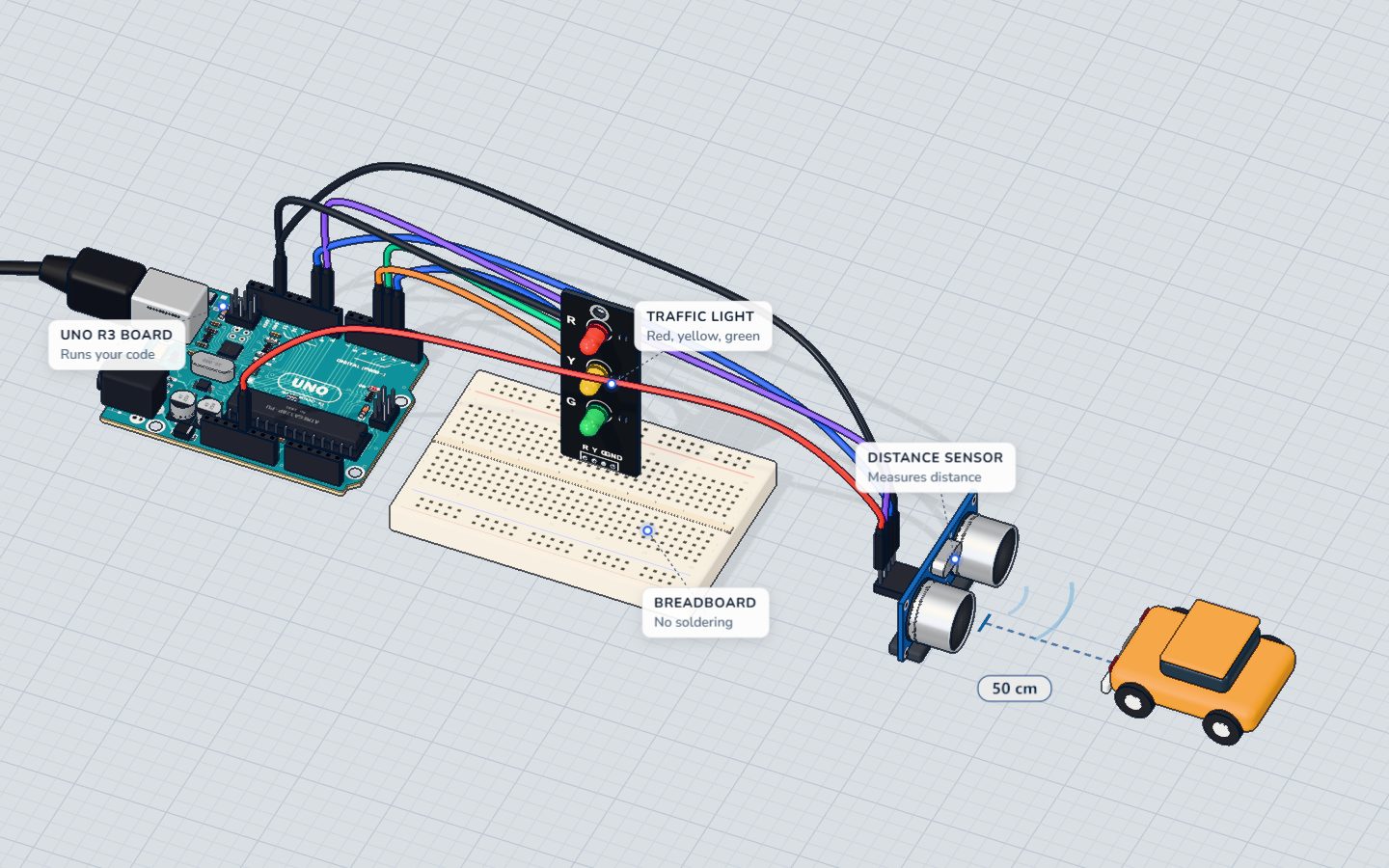
In the parking-sensor project the module stands in the breadboard with its four legs in four strips:
- R strip → pin 4.
- Y strip → pin 3.
- G strip → pin 2.
- GND strip → the UNO's GND.
Any digital pins work; you just change the numbers in the code. No extra resistors — they are on the board already.
Example code
This is the parking sensor sketch. An HC-SR04 measures the distance, and the module shows how close you are:
const int TRIG = 9, ECHO = 10;
const int RED = 4, YELLOW = 3, GREEN = 2;

long distanceCm() {
  digitalWrite(TRIG, HIGH);
  delayMicroseconds(10);
  digitalWrite(TRIG, LOW);
  return pulseIn(ECHO, HIGH) / 58;
}

void setup() {
  pinMode(TRIG, OUTPUT);
  pinMode(ECHO, INPUT);
  pinMode(RED, OUTPUT);
  pinMode(YELLOW, OUTPUT);
  pinMode(GREEN, OUTPUT);
  Serial.begin(9600);
}

void loop() {
  long cm = distanceCm();
  digitalWrite(GREEN, cm > 30);
  digitalWrite(YELLOW, cm > 15 && cm <= 30);
  digitalWrite(RED, cm <= 15);
  Serial.print(cm);
  Serial.println(" cm");
  delay(80);
}
const int RED = 4, YELLOW = 3, GREEN = 2;names the three pins, so the rest of the code reads like a sentence.pinMode(..., OUTPUT)for each colour — the Arduino drives them.digitalWrite(GREEN, cm > 30);is a neat trick: a comparison is either true (1, HIGH) or false (0, LOW), so the light simply follows the answer.cm > 15 && cm <= 30—&&means "and": yellow only between 16 and 30 cm.- Exactly one of the three conditions is true for any distance, so exactly one light is on.
Common mistakes
- Nothing lights. GND is not connected. All three colours return through that one pin.
- The wrong colour lights. Two signal wires are swapped. Compare the pin numbers in the code with the R / Y / G labels.
- Adding a second resistor "to be safe". It works, but the LEDs get dimmer. The 220 Ω is already on the board.
- Pins left as inputs. Forget
pinMode(..., OUTPUT)and the LED glows only faintly, if at all.
Check yourself
Do you need extra resistors with this module?
The resistors are built onto the module's board.
Roughly how much current does the red LED take from a 5 V pin?
(5 − 1.9) V ÷ 220 Ω ≈ 14 mA.
What does digitalWrite(GREEN, cm > 30) do when cm is 50?
A true comparison counts as 1, which is HIGH.
Questions people ask
Can I dim the traffic light LEDs with PWM?
Yes. Wire a colour to a ~ pin (3, 5, 6, 9, 10 or 11) and use analogWrite(pin, 0–255). Pin 3 is a PWM pin, so in the parking-sensor wiring yellow can already fade.
Does the traffic light module work with 3.3 V boards?
Usually yes, but dimmer: with 3.3 V only about 1.2–1.4 V is left for the resistor, so each LED gets roughly 6 mA.
Can I build the same thing from loose LEDs?
Of course: three LEDs, three 220 Ω resistors and a breadboard. The module just saves six legs and three resistors.
Where it is used
The module is the display of the parking sensor. To learn the sensor half of that project, read the HC-SR04 pinout guide.
Build it yourself in 3DFree, in your browser — no board, no wires, nothing to buy.Open the 3D lab →Your progress stays on this device — no account, nothing sent anywhere.
Last updated 2026-10-29

