What you need
 220 Ω resistor
- 10 kΩ resistor
 5 mm LED
 Arduino UNO R3 (or a compatible board)
 Half-size breadboard
- Jumper wires (male–male)
Don't have the parts? Build it in 3D first.
What it is
A resistor is a small part that limits current — it makes it harder for electricity to flow. How hard is its resistance, measured in ohms (Ω). 1 kΩ is 1,000 Ω and 10 kΩ is 10,000 Ω.
It has two legs and works either way round, so you can never put one in backwards. The coloured bands on its body tell you its value. See it in 3D.
How it works inside
Inside the body is a thin layer of carbon or metal film wrapped around a tiny ceramic rod. The thinner and longer the path, the harder it is for current to pass. The energy it takes from the current turns into a little heat.
The rule that connects everything is Ohm's law:
Double the resistance and the current halves. That is the whole trick. If it is new to you, read Ohm's law explained.
The three jobs it does in Arduino projects
The 3D lab has three values — 220 Ω, 1 kΩ and 10 kΩ — and each has its own job:
| Value | Job | Where you see it |
|---|---|---|
| 220 Ω | Limits an LED's current | Blink, RGB, knob, night light |
| 1 kΩ | Feeds a small current into a transistor's base | Motor and thermostat |
| 10 kΩ | Pull-down: holds an input at LOW | The push button |
| 10 kΩ | Divider: turns a sensor's resistance into a voltage | Light sensor, force sensor |
Protecting an LED. An LED has almost no resistance once it glows. With 220 Ω in the loop, a red LED on a 5 V pin gets:
| Value | |
|---|---|
| Pin voltage | 5 V |
| Red LED takes | 1.9 V |
| Left for the resistor | 3.1 V |
| Current: 3.1 V ÷ 220 Ω | ≈ 14 mA |
Take the resistor away and the current is limited by almost nothing — in our 3D lab the LED burns above 50 mA.
Pull-down. An input pin with nothing connected "floats" and reads random HIGHs and LOWs. A 10 kΩ resistor to GND gently holds it at LOW until a button connects it to 5 V. See pull-up and pull-down resistors.
Divider. A light sensor changes its resistance with light. Put it in series with a 10 kΩ resistor between 5 V and GND, and the voltage at the point in between changes too — which analogRead() can measure.
The pins
| Pin | What it does |
|---|---|
| Leg 1, leg 2 | Identical — either way round |
| Spec | Value |
|---|---|
| Values in the 3D lab | 220 Ω, 1 kΩ, 10 kΩ |
| Power | ¼ W |
| Tolerance | ±5 % (gold band) |
¼ W is plenty: the 220 Ω resistor in Blink turns only 3.1 V × 14 mA ≈ 0.04 W into heat.
How to read its value
Four bands: digit, digit, multiplier, tolerance. Red (2), red (2), brown (×10), gold (±5 %) = 220 Ω. Brown, black, orange = 10 × 1,000 = 10 kΩ. The full table is in the resistor colour code.
How to wire it to an Arduino
Put it in series — in the same loop — with the part it protects. In Blink:
- Pin 13 → the LED's long leg.
- The LED's short leg shares a breadboard row with one leg of the 220 Ω resistor.
- The resistor's other leg → GND.
It does not matter whether the resistor comes before or after the LED: the same current flows all the way round the loop.
Example code
A resistor needs no code — it just works. This sketch from the component library lights an LED on pin 9 through 220 Ω:
// An LED with a 220 Ω resistor: (5 V − 2 V) ÷ 220 Ω ≈ 14 mA
void setup() {
  pinMode(9, OUTPUT);
  digitalWrite(9, HIGH);
}
void loop() {}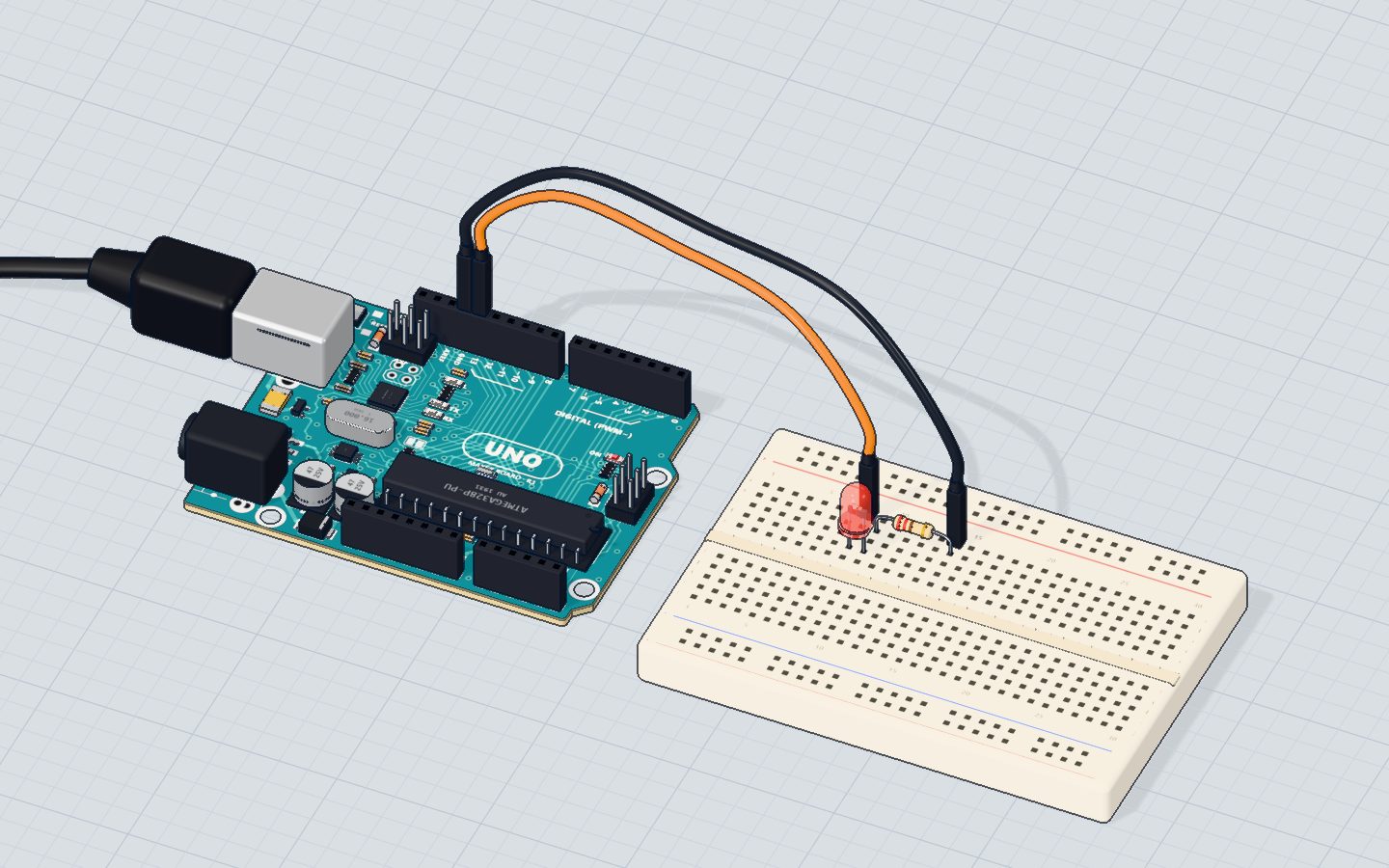
Common mistakes
- Both legs in the same breadboard row. The row joins them, so the resistor does nothing. Put its legs in different rows.
- 10 kΩ instead of 220 Ω for an LED. The LED gets about 0.3 mA and looks off. Check the bands.
- No resistor at all for an LED. The LED burns and the pin can be damaged.
- Mixing up 220 Ω and 220 kΩ. A yellow band (×10,000) in third place means kΩ — far too big for an LED.
Check yourself
Does a resistor have a + and a − leg?
A resistor has no direction; only parts like LEDs and diodes do.
What current flows through 220 Ω when 3.1 V is across it?
I = V ÷ R = 3.1 ÷ 220 ≈ 0.014 A.
What does a 10 kΩ pull-down resistor do for a button input?
Without it the pin floats and reads random values.
Questions people ask
What does a resistor do in an Arduino circuit?
It limits current. That protects LEDs and pins, holds inputs at a clear level (pull-up or pull-down), and makes voltage dividers that let sensors be read on analog pins.
Does it matter which way a resistor goes in?
No. Both legs are the same, so it works either way round.
What happens if I use the wrong resistor value?
Too small and an LED gets too much current and can burn. Too big and the LED is very dim or looks off. For LEDs on 5 V, 150 Ω to 1 kΩ is a safe range.
Why do resistors get hot?
The energy they take from the current becomes heat. Small ¼ W resistors in beginner circuits stay cool; if one gets hot, too much current is flowing — check for a short.
Where it is used
In almost every project: Blink an LED (220 Ω), the push button (10 kΩ pull-down) and the night light (10 kΩ divider).
Build it yourself in 3DFree, in your browser — no board, no wires, nothing to buy.Open the 3D lab →Your progress stays on this device — no account, nothing sent anywhere.
Last updated 2026-10-29